Overview

Note
…
Aliases
Fedora Linux
cd /etc/profile.d
touch my-aliases.sh
Copy and paste to my-aliases.sh:
alias la='ls -lAh --color=auto'
alias gitcup='git add . && git commit -am "Updates." && git push'
alias gitcu='git add . && git commit -am "Updates."'
alias gitfap='git fetch --all --prune'
Restart terminal.
macOS
cd ~
touch .aliases
Copy and paste to .aliases:
alias la='ls -lAh --color=auto'
alias gitcup='git add . && git commit -am "Updates." && git push'
alias gitcu='git add . && git commit -am "Updates."'
alias gitfap='git fetch --all --prune'
Add this line to ~/.zshenv:
[ -f ~/.aliases ] && source ~/.aliases
Restart terminal.
Bash useful scripts
Managing multiple Rust projects
If there is a Rust project, containing multiple Rust subprojects and all of them are placed in a single parent directory and each project is a Git repository, then the following script may be helpful to issue common commands for all of them as a single command.
This script does the following:
- lists all directories,
- executes the specified command for each repository.
#!/usr/bin/env bash

action () {
  case "$1" in
    "clean")  set_up $1 $2 && cargo clean                             && tear_down ;;
    "build")  set_up $1 $2 && cargo build                             && tear_down ;;
    "clippy") set_up $1 $2 && cargo clippy                            && tear_down ;;
    "test")   set_up $1 $2 && cargo test -q 2>/dev/null               && tear_down ;;
    "deps")   set_up $1 $2 && cargo tree | grep --color=never dmntk   && tear_down ;;
    "status") set_up $1 $2 && git status -sb                          && tear_down ;;
    *) usage $1
  esac
}

set_up () {
  echo ""
  echo "========================"
  echo "$1:  $2"
  echo "========================"
  cd $2
}

tear_down () {
  cd ..
}

usage () {
  echo ""
  echo "unknown command: '$1'"
  echo ""
  echo "commands:"
  echo "  clean    => cargo clean "
  echo "  build    => cargo build"
  echo "  clippy   => cargo clippy"
  echo "  test     => cargo test -q 2>/dev/null"
  echo "  deps     => cargo tree | grep --color=never dmntk"
  echo "  status   => fit status -sb"
  echo ""
  exit 1
}

ls -d */ | while read line
do
  action $1 $line
done
Changing crate owner
Tip
You have to be logged-in to crates.io registry before executing any of the following commands.
Adding owner (user)
cargo owner --add login crate_name
For example, to add an owner DariuszDepta to crate antex, type:
cargo owner --add DariuszDepta antex
Adding owner (team)
cargo owner --add github:organization:team crate_name
For example, to add a core team of EngosSoftware organization as an owner to crate antex, type:
cargo owner --add github:EngosSoftware:core antex
Removing owner (user)
cargo owner --remove login crate_name
For example, to remove an owner DariuszDepta from crate antex, type:
cargo owner --remove DariuszDepta antex
Removing owner (team)
For example, to remove a core team of EngosSoftware organization from being an owner of the crate antex, type:
cargo owner --remove github:EngosSoftware:core antex
Changelog entries
The script shown below generates useful changelog entries for issues and PRs assigned to specific milestone in GitHub repository:
#!/usr/bin/env bash

MILESTONE="$1"
REPOSITORY="$2"

names() {
  gh "$1" list --search "milestone:$MILESTONE" \
               --state all \
               --repo $REPOSITORY \
               --json number,title \
               --template '{{range .}}{{printf "- %s ([#%v])\n" .title .number}}{{end}}'
}

links() {
  gh "$1" list --search "milestone:$MILESTONE" \
               --state all \
               --repo $REPOSITORY \
               --json number,url \
               --template '{{range .}}{{printf "[#%v]: %s\n" .number .url}}{{end}}'
}

printf "\nISSUES:\n\n"
names issue
printf "\nPULL REQUESTS:\n\n"
names pr
printf "\nISSUES:\n\n"
links issue
printf "\nPULL REQUESTS:\n\n"
links pr
printf "\n"
To use this script, you need to be logged in to GitHub using gh.
touch chlog.sh
chmod +x chlog.sh
(paste the content of the script to chlog.sh file)
Run the script:
./chlog.sh 3.0.3 cosmwasm/cosmwasm
Example output:
ISSUES:

- Update MIGRATING.md for version 3.0.x ([#2594])
- Fix typos ([#2579])
- Update GitHub actions to the newest versions ([#2578])
- Update CHANGELOG.md for v3.0.2 ([#2577])
- cargo install cosmwasm-check fails to compile ([#2536])

PULL REQUESTS:

- Updated CHANGELOG with unreleased issues and PRs ([#2603])
- Fixed typos. ([#2602])
- Updated Telegram link ([#2601])
- docs(README): fix the community link to Telegram and add a link to the CosmWasm icon ([#2597])
- Updated MIGRATING.md ([#2595])
- chore: fix some typos ([#2591])
- core: assert BLS12-381 generator length invariants ([#2586])
- Improved development scripts ([#2581])
- Fix articles in `Int` type comments ([#2576])
- CI: migrate workflows to checkout v6 ([#2564])
- chore: fix some comments ([#2562])
- doc: fix  typos ([#2561])
- docs: fix minor grammar ([#2560])
- chore: fix some typos and inaccuracies ([#2559])
- Fix typo ([#2558])
- chore: fix typo in README.md ([#2556])
- ci: upgrade GitHub Action to download-artifact@v5 ([#2555])
- docs: fix typos ([#2554])
- chore: fix minor typos ([#2551])
- chore: fix minor typos ([#2550])
- Correct minor grammar mistakes ([#2549])
- docs: fix typo ([#2547])
- Moved MSRV.md to Wiki ([#2546])
- Moved CHECKS.md content to Wiki ([#2545])
- Updated schemas ([#2544])
- chore: fix typos in function names ([#2542])
- fix: grammar issues in contracts and IBC code comments ([#2541])
- chore: Remove duplicate words to make the comments more readable ([#2540])

ISSUES:

[#2594]: https://github.com/CosmWasm/cosmwasm/issues/2594
[#2579]: https://github.com/CosmWasm/cosmwasm/issues/2579
[#2578]: https://github.com/CosmWasm/cosmwasm/issues/2578
[#2577]: https://github.com/CosmWasm/cosmwasm/issues/2577
[#2536]: https://github.com/CosmWasm/cosmwasm/issues/2536

PULL REQUESTS:

[#2603]: https://github.com/CosmWasm/cosmwasm/pull/2603
[#2602]: https://github.com/CosmWasm/cosmwasm/pull/2602
[#2601]: https://github.com/CosmWasm/cosmwasm/pull/2601
[#2597]: https://github.com/CosmWasm/cosmwasm/pull/2597
[#2595]: https://github.com/CosmWasm/cosmwasm/pull/2595
[#2591]: https://github.com/CosmWasm/cosmwasm/pull/2591
[#2586]: https://github.com/CosmWasm/cosmwasm/pull/2586
[#2581]: https://github.com/CosmWasm/cosmwasm/pull/2581
[#2576]: https://github.com/CosmWasm/cosmwasm/pull/2576
[#2564]: https://github.com/CosmWasm/cosmwasm/pull/2564
[#2562]: https://github.com/CosmWasm/cosmwasm/pull/2562
[#2561]: https://github.com/CosmWasm/cosmwasm/pull/2561
[#2560]: https://github.com/CosmWasm/cosmwasm/pull/2560
[#2559]: https://github.com/CosmWasm/cosmwasm/pull/2559
[#2558]: https://github.com/CosmWasm/cosmwasm/pull/2558
[#2556]: https://github.com/CosmWasm/cosmwasm/pull/2556
[#2555]: https://github.com/CosmWasm/cosmwasm/pull/2555
[#2554]: https://github.com/CosmWasm/cosmwasm/pull/2554
[#2551]: https://github.com/CosmWasm/cosmwasm/pull/2551
[#2550]: https://github.com/CosmWasm/cosmwasm/pull/2550
[#2549]: https://github.com/CosmWasm/cosmwasm/pull/2549
[#2547]: https://github.com/CosmWasm/cosmwasm/pull/2547
[#2546]: https://github.com/CosmWasm/cosmwasm/pull/2546
[#2545]: https://github.com/CosmWasm/cosmwasm/pull/2545
[#2544]: https://github.com/CosmWasm/cosmwasm/pull/2544
[#2542]: https://github.com/CosmWasm/cosmwasm/pull/2542
[#2541]: https://github.com/CosmWasm/cosmwasm/pull/2541
[#2540]: https://github.com/CosmWasm/cosmwasm/pull/2540
Compiling performance
Comparison of the compiling performance using different processors and operating systems.
Note
All numbers in results are given in seconds.
Tested crates
cargo install dmntk --force
cargo install dsntk --force
Tested versions
macOS
M4 Pro
macOS Tahoe 26.2, M4 Pro (12 cores), 64GB unified memory
| dmntk | dsntk |
|---|---|
| 24.98 | 27.44 |
| 24.66 | 26.60 |
| 25.16 | 26.35 |
| 25.03 | 26.72 |
| 25.14 | 26.63 |
| 25.86 | 27.59 |
| 25.41 | 26.50 |
| 25.92 | 26.71 |
| 24.93 | 26.28 |
| 24.95 | 26.34 |
| avg: 25.20 | avg: 26.72 |
Fedora Linux 43
Intel Core® i5
Intel Core® i5-8500T (6 cores), CPU@2.1GHz, 32GB DDR4@2666MT/s
| dmntk | dsntk |
|---|---|
| 89.0 | 93.0 |
| 92.0 | 90.0 |
| 89.0 | 91.0 |
| 89.0 | 92.0 |
| 89.0 | 91.0 |
| 89.0 | 90.0 |
| 92.0 | 90.0 |
| 88.0 | 91.0 |
| 90.0 | 92.0 |
| 89.0 | 90.0 |
| avg: 89.6 | avg: 91.0 |
Intel Core® i7 (tbd)
Intel Core® i7-6700 (4 cores), CPU@3.4GHz, 32GB DDR4@2133MT/s
AMD Ryzen 7 (tbd)
Useful commands
Check memory details:
sudo dmidecode --type memory
Check processor details:
lscpu
Clear swap disk:
sudo swapoff -a
sudo swapon -a
A loop for executing tests quasi-automatically:
for i in $(seq 1 12);
do
  cargo install dmntk --force 2>&1 | grep Finished
done
And some helpful Erlang code snippet:
A = [89.0,92.0,89.0,89.0,89.0,89.0,92.0,88.0,90.0,89.0].
AvgA = lists:foldl(fun(X, Sum) -> X + Sum end, 0, A) / length(A).
Configuring VPS on AlmaLinux 10
Docker is preinstalled by VPS vendor
Change password
After logging-in for the first time to VPS as a root, change the password:
$ passwd
Update system
$ dnf update
Check Docker
$ docker --version
Docker version 29.4.0, build 9d7ad9f
Install Docker Compose
Check the newest version of Docker Compose here: https://github.com/docker/compose/releases.
$ curl -L https://github.com/docker/compose/releases/download/v5.1.2/docker-compose-linux-x86_64 -o /usr/local/bin/docker-compose
$ chmod +x /usr/local/bin/docker-compose
$ docker-compose --version
Docker Compose version v5.1.2
Sometimes it may be handy to use shorter name, like dkc to run Docker Compose,
in this case create a symbolic link:
$ ln -s /usr/local/bin/docker-compose /usr/bin/dkc
$ dkc --version
Docker Compose version v5.1.2
Install nginx
$ dnf install nginx
$ systemctl start nginx
$ systemctl enable nginx
$ systemctl status nginx
Update firewall
$ dnf install firewalld
$ systemctl start firewalld
$ systemctl enable firewalld
$ firewall-cmd --permanent --zone=public --add-service=https --add-service=http
$ firewall-cmd --reload
Install Certbot
$ dnf install epel-release
$ dnf install certbot python3-certbot-nginx
$ certbot --version
certbot 4.2.0
Install Docker registry
$ docker pull registry:2
$ cd /opt
$ mkdir registry
$ cd registry
$ mkdir auth
$ mkdir certs
$ mkdir data
$ touch docker-compose.yml
Write the following content of the docker-compose.yml file in /opt/registry directory:
services:
  registry:
    image: registry:2
    restart: always
    environment:
      REGISTRY_AUTH: htpasswd
      REGISTRY_AUTH_HTPASSWD_PATH: /auth/htpasswd
      REGISTRY_AUTH_HTPASSWD_REALM: Registry Realm
    volumes:
     - /opt/registry/data:/var/lib/registry
     - /opt/registry/certs:/certs
     - /opt/registry/auth:/auth
To create the password for <user-name>, change to /opt/registry directory and run:
$ dnf install httpd-tools
$ htpasswd -Bc auth/htpasswd <user-name>
Generate and copy certificates for <domain-name>:
$ certbot certonly --nginx
$ cp /etc/letsencrypt/live/<domain-name>/fullchain.pem /opt/registry/certs/
$ cp /etc/letsencrypt/live/<domain-name>/privkey.pem /opt/registry/certs/
Start the registry:
$ dkc up --no-start
$ dkc start
$ docker ps
Login to Docker registry (from client machine):
docker login -u <user-name> <domain-name>
Configuring VPS on CentOs 8
Change root password
After logging-in for the first time to VPS as a root, change the password:
passwd
Generate SSH keys
mkdir ~/.ssh
ssh-keygen -b 4098
Copy keys from remote machine
ssh-copy-id user@address
Check the name and version of the operating system
cat /etc/os-release
Set locale
localectl
localectl list-locales
localectl set-locale LANG=en_US.utf8
To remove the message Failed to set locale, defaulting to C.UTF-8, execute:
dnf install langpacks-en glibc-all-langpacks -y
Update system libraries
yum update
Install Docker
dnf config-manager --add-repo=https://download.docker.com/linux/centos/docker-ce.repo
dnf list docker-ce
dnf install docker-ce --nobest -y
systemctl start docker
systemctl enable docker
Check installed version:
docker --version
Docker version 20.10.7, build f0df350
Install Docker Compose
Check the newest version of Docker Compose here: https://github.com/docker/compose/releases.
curl -L https://github.com/docker/compose/releases/download/1.29.2/docker-compose-`uname -s`-`uname -m` -o /usr/local/bin/docker-compose
Sometimes it may be handy to use shorter name, like dkc to run Docker Compose, so create a symlink:
ln -s /usr/local/bin/docker-compose /usr/bin/dkc
chmod +x /usr/local/bin/docker-compose
Check installed version:
dkc --version
docker-compose version 1.29.2, build 5becea4c
Install nginx
yum search nginx
yum install nginx
systemctl start nginx
systemctl enable nginx
Update firewall
yum install firewalld
systemctl start firewalld
systemctl enable firewalld
firewall-cmd --permanent --zone=public --add-service=https --add-service=http
firewall-cmd --reload
Install Certbot
yum install https://dl.fedoraproject.org/pub/epel/epel-release-latest-8.noarch.rpm
dnf install certbot python3-certbot-nginx
certbot certonly --nginx
Install Docker registry
docker pull registry:2
cd /opt
mkdir registry
cd registry
mkdir auth
mkdir certs
mkdir data
touch docker-compose.yml
Content of the docker-compose.yml file
version: '3'

services:

  registry:
    restart: always
    image: registry:2
    ports:
     - "port_number:5000"
    environment:
      REGISTRY_AUTH: htpasswd
      REGISTRY_AUTH_HTPASSWD_PATH: /auth/htpasswd
      REGISTRY_AUTH_HTPASSWD_REALM: Registry Realm
    volumes:
     - /opt/registry/data:/var/lib/registry
     - /opt/registry/certs:/certs
     - /opt/registry/auth:/auth
Create password file, change to /opt/registry directory:
yum install httpd-tools
docker run --entrypoint htpasswd httpd:2 -Bbn user password > auth/htpasswd ; history -d $(history 1)
Generate and copy certificates:
certbot certonly --nginx
cp /etc/letsencrypt/live/domain_name/fullchain.pem /opt/registry/certs/
cp /etc/letsencrypt/live/domain_name/privkey.pem /opt/registry/certs/
Run the registry
dkc up --no-start
dkc start
docker ps
Login to Docker registry
docker login -u user_name domain_name
Crates
Tooling
| Name | Version | Description |
|---|---|---|
| antex |  | Styled text and tree in terminal |
| arrows-svg |  | SVG arrow generator |
| biff |  | Byte by byte file comparator |
| bin2bcd |  | Binary-BCD-Binary conversion using double-dabble algorithm |
| cli-assert |  | Testing command-line applications |
| coverio |  | Better code coverage reporting for Rust crates |
| dec-number |  | Decimal Floating Point Arithmetic for Rust |
| dec-number-sys |  | Rust bindings for The decNumber C library by IBM Fellow Mike Cowlishaw |
| decimus |  | Decimal Floating-Point Math Library for Rust |
| dfp-number |  | Decimal floating-point arithmetic for Rust |
| dfp-number-sys |  | Rust bindings for Intel® Decimal Floating-Point Math Library |
| domrs |  | Document builder and serializer |
| dte |  | Decision table editor |
| dtee |  | Decision table editor engine |
| htop |  | HTML to PDF converter |
| idml |  | Parser for Indented Delimiter Markup Language |
| kivi |  | Key-value pair with key and value in separate lines |
| mdbook-yapp |  | mdBook preprocessor for simple text replacements |
| myers |  | A file comparison program |
| normalized-line-endings |  | Returns an iterator over characters with all line endings converted to \n (U+000A) |
| palindronum |  | Number palindromes |
| renumber |  | Renumber tests or benchmarks |
| scidec |  | Scientific number converter |
| secel |  | SECEL parser |
| wasmarin |  | Singlepass WebAssembly compiler |
CosmWasm
(tbd)
ÐecisionToolkit
| Name | Version | Description |
|---|---|---|
| dsntk |  | Design and execute decisions. |
Deleting multiple GitHub workflows
Install GitHub CLI:
sudo dnf install gh
Login to GitHub account:
gh auth login
Save the bash code to file, make it executable, replace placeholders with proper values and run:
#!/usr/bin/env bash

# number of most recent workflows to be preserved (not deleted)
SKIP=_place_the_number_of_workflow_runs_to_be_skipped_

# name of the github account
GITHUB_OWNER=_place_your_GitHub_user_account_here_

# name of the repository
GITHUB_REPOSITORY=_place_GitHub_repository_name_here_

function delete_workflow_run() {
  gh api --method DELETE \
         -H "Accept: application/vnd.github+json" \
         -H "X-GitHub-Api-Version: 2022-11-28" \
         /repos/$GITHUB_OWNER/$GITHUB_REPOSITORY/actions/runs/$1
}

gh api -H "Accept: application/vnd.github+json" \
       -H "X-GitHub-Api-Version: 2022-11-28" \
       /repos/$GITHUB_OWNER/$GITHUB_REPOSITORY/actions/runs?per_page=100 \
| jq -r '.workflow_runs[] | [.updated_at, .id] | @tsv' \
| sort -r -k 1 \
| tail -n "+$((SKIP + 1))" \
| awk '{print $2}' \
| while read -r RUN_ID ; do
    delete_workflow_run "$RUN_ID";
  done
Discovering Cosmos
See: https://docs.cosmos.network
Prerequisites
Install the newest version of Go
See: https://go.dev/doc/install
Check installed Go version:
go version
Output:
go version go1.26.1 linux/amd64
Install the newest version of IgniteCLI
See: https://docs.ignite.com/welcome/install
Check installed Ignite CLI version:
ignite version
Output:
Ignite CLI version:             v29.9.2-dev
Ignite CLI build date:          2026-03-23T17:16:10Z
Ignite CLI source hash:         0e62049549f35d43be315e251af8429c00d90242
Ignite CLI config version:      v1
Cosmos SDK version:             v0.53.6
Buf.build version:              undefined
Your OS:                        linux
Your arch:                      amd64
Your go version:                go version go1.26.1 linux/amd64
Install jq
See: https://jqlang.github.io/jq/download
Check installed jq version:
jq --version
Output:
jq-1.8.1
Install curl
See: https://curl.se
Check installed curl version:
curl --version
Output:
curl 8.15.0 [...]
Create a chain
Scaffold a chain named disco:
ignite scaffold chain disco
Output:
⭐️ Successfully created a new blockchain 'disco'.
👉 Get started with the following commands:

 % cd disco
 % ignite chain serve

Documentation: https://docs.ignite.com
Follow the instructions above:
cd disco
ignite chain serve
Discovering CosmWasm
See: https://github.com/CosmWasm
wasmd
(tbd)
Useful commands
List all keys
Command:
wasmd keys list --keyring-backend=test
Output (it’s an example, may differ in your case):
- address: wasm104cecw2t7233tnff92nmfq4n3x9m4x46x83329
  name: alice
  pubkey: '{"@type":"/cosmos.crypto.secp256k1.PubKey","key":"A5YZRzrPqFSwp5D2xSM/FwFDQZV0RbrRYPch97jnb2e4"}'
  type: local
- address: wasm1s50tys9wvh9hnhvct4jc27wpnn56v04nlepcr9
  name: bob
  pubkey: '{"@type":"/cosmos.crypto.secp256k1.PubKey","key":"AiKdbC6+KHphU077KWUPVnNv84Zh2erSlrByzyUCHeW6"}'
  type: local
- address: wasm1my05nkttpz33actpxav6kdtgfr78nnzzh8pdgu
  name: cecil
  pubkey: '{"@type":"/cosmos.crypto.secp256k1.PubKey","key":"A4HqONgHLbbnRpqppudZg+FNK9cRy8/T/7d3SDc1IBGS"}'
  type: local
- address: wasm15dlde68zey5spp3m8xk0nxtmsd4e5a5jrgmdzg
  name: dave
  pubkey: '{"@type":"/cosmos.crypto.secp256k1.PubKey","key":"Agl5qrJKM0mljZdJep191jkkfM1fEpq7wq/RR381Uhx8"}'
  type: local
Query balances
Query balances for alice:
wasmd query bank balances wasm104cecw2t7233tnff92nmfq4n3x9m4x46x83329
Output:
balances:
- amount: "999750000000"
  denom: stake
pagination:
  total: "1"
Fedora 35 solid desktop color
Fedora 35 has fascinating desktop background pictures. But I am used to have a solid background color. To set the solid background color for desktop, issue the following commands:
gsettings set org.gnome.desktop.background picture-uri ''
gsettings set org.gnome.desktop.background primary-color '#10199E'
Here is a helpful list of web colors.
Git useful commands
Add alias for displaying the status
git config --global alias.s status
Display current configuration
git config --list
Add user configuration
git config --global user.name "Your Name"
git config --global user.email "name@mail.com"
Set pull/rebase behavior
git config --global pull.rebase true
Set the remote as upstream:
git config --global push.autoSetupRemote true
Remove remote branches from local repository
git remote prune origin
Delete the local branch that was pruned
git branch -D name-of-the-branch-to-delete
Show all branches
git branch -a
Discover changes between two branches
git diff --name-status branch_one..branch_two
Compare two branches
git diff branch_one..branch_two
Use another identity
git config core.sshcommand "ssh -i ~/.ssh/your_private_key -o IdentitiesOnly=yes -F /dev/null"
Remove last commit
git reset --hard HEAD^
git push origin -f
Working with remotes
View existing remotes
git remote
or with showing URLs:
git remote -v
Add a remote
git remote add <name> <url>
e.g.:
git remote add private https://github.com/username/private_repo.git
Remove a remote
git remote remove <name>
Rename a remote
git remote rename <old-name> <new-name>
Change remote URL
git remote set-url <name> <new-url>
Example usage
git remote add private https://github.com/username/private_repo.git
git push -u private main
Tip
-u,--set-upstreamFor every branch that is up to date or successfully pushed, add upstream (tracking) reference, used by argument-less git-pull and other commands.
Git server
CentOS Linux
Install Git:
sudo yum install git
Create git user:
sudo useradd -r -m -U -d /home/git -s /bin/bash git
Switch to user git:
sudo su - git
Create a directory for SSH keys:
mkdir -p ~/.ssh && chmod 0700 ~/.ssh
Create a file for storing authorized SSH keys:
touch ~/.ssh/authorized_keys && chmod 0600 ~/.ssh/authorized_keys
Disable shell for git user:
cat /etc/shells
which git-shell
sudo -e /etc/shells
sudo chsh git -s $(which git-shell)
Create an empty repository, must be created under /home/git:
git init --bare your_repository_name.git
Migrate the whole repository from existing repository (e.g. on Bitbucket):
git clone --bare git@bitbucket.org:company_name/your_repository_name.git
cd your_repository_name.git
git push --mirror git@your_domain:~/your_repository_name.git
Clone from repository:
git clone git@your_domain:~/your_repository_name.git
AlmaLinux
Install Git:
$ dnf install git
Create git user:
$ useradd -r -m -U -d /home/git -s /bin/bash git
where:
-r- create a system account-m- create the user’s home directory-U- create a group with the same name as the user-d /home/git- home directory of the new account-s /bin/bash- login shell of the new account
Switch to user git:
$ su - git
Create a directory for SSH keys:
mkdir -p ~/.ssh && chmod 0700 ~/.ssh
Create a file for storing authorized SSH keys:
touch ~/.ssh/authorized_keys && chmod 0600 ~/.ssh/authorized_keys
Edit authorized_keys file and save there public keys of the users
that should have access to the git repository.
Switch back to root:
exit
Check the shell for git user:
$ which git-shell
Output:
/usr/bin/git-shell
Disable shell for git user:
$ cat /etc/shells      # see if git-shell is already in there. If not...
$ which git-shell      # ...make sure git-shell is installed on your system, and...
$ sudo -e /etc/shells  # ...add the path to git-shell from last command.
$ chsh git -s $(which git-shell)
Create a test Git repository:
$ cd /home/git
$ git config --global init.defaultBranch main
$ git init --bare test.git
$ chown -R git:git test.git
Clone this repository on client machine:
git clone git@<your_domain_or_address>:~/test.git
References
Working with GitHub CLI
Listing projects
gh project list --owner <OWNER>
Example:
gh project list --owner CosmWasm
Output:
NUMBER  TITLE    STATE  ID
18      Backlog  open   PVT_kwDOAxqsQs4BMFiU
15      Q1.2026  open   PVT_kwDOAxqsQs4BKc_6
Listing project items
gh project item-list <PROJECT_NUMBER> --owner <OWNER> --limit <LIMIT>
Example:
gh project item-list 15 --owner CosmWasm --limit 10
Output:
TYPE         TITLE                                                                                  NUMBER  REPOSITORY                 ID
Issue        Update details of CWA-2005-007                                                         86      CosmWasm/advisories        PVTI_lADOAxqsQs4BKc_6zgkdr3w
Issue        Review `Heap profiling` page                                                           2       CosmWasm/maintainers       PVTI_lADOAxqsQs4BKc_6zgigNsc
Issue        Optimize `Poseidon Hash` Implementation in CosmWasm Contracts                          2575    CosmWasm/cosmwasm          PVTI_lADOAxqsQs4BKc_6zgigPzc
Issue        error: linking with `cc` failed: exit status: 1;  rustc 1.91.1 (ed61e7d7e 2025-11-07)  2563    CosmWasm/cosmwasm          PVTI_lADOAxqsQs4BKc_6zgigP6w
Issue        Compiling `cosmwasm-check` breaks for Rust 1.89.0                                      2543    CosmWasm/cosmwasm          PVTI_lADOAxqsQs4BKc_6zgigP-4
Issue        Rust 1.87 requires bulk-memory proposal                                                2485    CosmWasm/cosmwasm          PVTI_lADOAxqsQs4BKc_6zgigQGI
PullRequest  Update to Wasmer 6.0.0-beta.1                                                          2441    CosmWasm/cosmwasm          PVTI_lADOAxqsQs4BKc_6zgigQbw
Issue        Bulk Memory Validation Error with wasmvm v3.0.0 and wasmd v0.61.0                      2316    CosmWasm/wasmd             PVTI_lADOAxqsQs4BKc_6zgigV38
Issue        Hosting website's server configuration                                                 3       CosmWasm/cosmwasm-website  PVTI_lADOAxqsQs4BKc_6zgihJ1g
Issue        Update GitHub actions to the newest versions                                           2578    CosmWasm/cosmwasm          PVTI_lADOAxqsQs4BKc_6zgihU34
Listing project items with title and URL
gh project item-list 15 --owner CosmWasm --format json --jq '.items[].content | {title, url}'
gh project item-list 15 --owner CosmWasm --format json --jq '.items[].content | {title, url, status}'
gh project item-list 15 --owner CosmWasm --format json | jq '.items[] | select(.status == "Done") | .content'
gh project item-list 15 --owner CosmWasm --format json --limit 500 | jq '.items[] | select(.status=="Done") | {title: .content.title, url: .content.url, status: .status}'
List labels for an issue/PR
gh issue view <ISSUE_URL> --json labels --jq '.labels[].name'
Example:
gh issue view https://github.com/CosmWasm/advisories/issues/86 --json labels --jq '.labels[].name'
Output:
documentation
g:security
GitHub actions
Recent versions
Last update: 2026-05-22
actions/checkout
v6.0.2
To retrieve the latest version, run:
curl -sSL https://api.github.com/repos/actions/checkout/releases/latest | jq -r '.tag_name'
actions/setup-node
v6.4.0
To retrieve the latest version, run:
curl -sSL https://api.github.com/repos/actions/setup-node/releases/latest | jq -r '.tag_name'
actions/configure-pages
v6.0.0
To retrieve the latest version, run:
curl -sSL https://api.github.com/repos/actions/configure-pages/releases/latest | jq -r '.tag_name'
actions/upload-pages-artifact
v5.0.0
To retrieve the latest version, run:
curl -sSL https://api.github.com/repos/actions/upload-pages-artifact/releases/latest | jq -r '.tag_name'
actions/deploy-pages
v5.0.0
To retrieve the latest version, run:
curl -sSL https://api.github.com/repos/actions/deploy-pages/releases/latest | jq -r '.tag_name'
Installing Bison on Linux
General procedure
Head to GNU/Bison web page: https://www.gnu.org/software/bison/
Select the download source, let say GNU/FTP: http://ftp.gnu.org/gnu/bison/
Download the newest version (it was 3.8.2 at the time of writing this post):
wget http://ftp.gnu.org/gnu/bison/bison-3.8.2.tar.gz
Unpack sources:
tar -xzf bison-3.8.2.tar.gz
cd bison-3.8.2
Before proceeding check if m4 is already installed, if not:
sudo yum install m4
Configure, build and install Bison from sources:
./configure
make
sudo make install
Check the installed version:
bison -V
bison (GNU Bison) 3.8.2
Installing newest Bison
This note describes how to install the newest version of Bison.
Open the GNU Bison website: https://www.gnu.org/software/bison/
and find the link with mirrors to download the sources.
Open the nearest mirror, e.g. http://ftp.task.gda.pl/pub/gnu/bison/
Search the newest version of Bison, e.g. http://ftp.task.gda.pl/pub/gnu/bison/bison-3.7.6.tar.gz
download it, and save in any directory, e.g. ~/Downloads.
Fedora
sudo yum uninstall bison
Unpack the archive:
cd ~/Downloads
tar -xzf bison-3.7.6.tar.gz
cd bison-3.7.6
The installation procedure is described in details in INSTALL file.
Here is the short path:
./configure
make
sudo make install
To uninstall current version of Bison execute command:
sudo make uninstall
Debian
sudo apt-get remove bison
Unpack the archive:
cd ~/Downloads
tar -xzf bison-3.7.6.tar.gz
cd bison-3.7.6
The installation procedure is described in details in INSTALL file.
Here is the short path:
./configure
make
sudo make install
To uninstall current version of Bison execute command:
sudo make uninstall
Installing Docker and Docker Compose
Fedora Linux
sudo dnf -y install dnf-plugins-core
sudo dnf config-manager --add-repo https://download.docker.com/linux/fedora/docker-ce.repo
sudo dnf install docker-ce docker-ce-cli containerd.io
sudo systemctl start docker
sudo systemctl enable docker
Add a user to docker group:
sudo groupadd docker
sudo usermod -aG docker $USER
newgrp docker
macOS
Install Docker
brew install docker
brew install colima
brew services start colima
Restart.
Check the installed Docker version:
docker --version
Output:
Docker version 29.1.2, build 890dcca
The login credentials are stored in:
/Users/user_name/.docker/config.json
It is not a safe way to sore credentials, anyway, after modifying this file run:
colima restart
Install Docker Compose
brew install docker-compose
Update .docker/config.json file, add the following entry:
  "cliPluginsExtraDirs": [
    "/opt/homebrew/lib/docker/cli-plugins"
  ]
colima restart
Check the installed version:
docker-compose version
Output:
Docker Compose version 5.0.0
References
Installing Go
Downloading
Download the newest installation version from
For Linux, it could be a link:
Installing
Follow the installation instructions:
Fedora
Remove the old version:
sudo rm -rf /usr/local/go
Unpack the new version:
sudo tar -C /usr/local -xzf go1.23.5.linux-amd64.tar.gz
Update the .bash_profile:
# Added by Go installer
export PATH=$PATH:/usr/local/go/bin
export PATH=$PATH:$HOME/go/bin
Restart user session or reboot.
Check the installed version:
go version
Output:
go version go1.23.5 linux/amd64
Installing Node, npm, nvm
Linux
Check installed version of node:
node -v
Check installed version of npm:
npm -v
Check installed version of nvm:
nvm -v
NVM
Install nvm:
curl -o- https://raw.githubusercontent.com/nvm-sh/nvm/v0.40.1/install.sh | bash
or
wget -qO- https://raw.githubusercontent.com/nvm-sh/nvm/v0.40.1/install.sh | bash
See: https://github.com/nvm-sh/nvm
Output:
=> Compressing and cleaning up git repository

=> Appending nvm source string to /home/user/.bashrc
=> Appending bash_completion source string to /home/user/.bashrc
=> You currently have modules installed globally with `npm`. These will no
=> longer be linked to the active version of Node when you install a new node
=> with `nvm`; and they may (depending on how you construct your `$PATH`)
=> override the binaries of modules installed with `nvm`:

/usr/local/lib
└── npm-check-updates@17.1.14
=> If you wish to uninstall them at a later point (or re-install them under your
=> `nvm` node installs), you can remove them from the system Node as follows:

     $ nvm use system
     $ npm uninstall -g a_module

=> Close and reopen your terminal to start using nvm or run the following to use it now:

export NVM_DIR="$HOME/.nvm"
[ -s "$NVM_DIR/nvm.sh" ] && \. "$NVM_DIR/nvm.sh"  # This loads nvm
[ -s "$NVM_DIR/bash_completion" ] && \. "$NVM_DIR/bash_completion"  # This loads nvm bash_completion
Node
Install node version you need:
nvm install v18.16.0
Install the latest LTS release of Node.js:
nvm install --lts
List all available versions to install:
nvm ls-remote
NPM
Install the latest version:
npm install -g npm@latest
npmjs
To add user for logging in npmjs
npm adduser
and follow the instructions in the browser.
Publish package:
npm publish
macOS
brew install nvm
nvm install 24
nvm --version
Output:
0.40.3
node --version
Output:
v24.12.0
npm --version
Output:
11.6.2
Installing OpenJDK
How to install version 25.0.1 of OpenJDK
macOS
Download:
tar -xzvf openjdk-25.0.1_macos-aarch64_bin.tar.gz
sudo mv jdk-25.0.1.jdk /Library/Java/JavaVirtualMachines/
Check installed version:
java --version
Output:
openjdk 25.0.1 2025-10-21
OpenJDK Runtime Environment (build 25.0.1+8-27)
OpenJDK 64-Bit Server VM (build 25.0.1+8-27, mixed mode, sharing)
References
Installing Taskfile
Taskfile installation methods are described in details here.
Fast and short way for Fedora 35.
Login as superuser.
sh -c "$(curl --location https://taskfile.dev/install.sh)" -- -d -b /usr/local/bin
cd /usr/local.bin
ln -s /usr/local/bin/task t
Logout.
Open any terminal as any user and type t to run Taskfile.
Internet speed test
Application used for tests: https://www.speedtest.pl/
| What/Where | Delay | Download | Upload |
|---|---|---|---|
| [ms] | [Mb/s] | [Mb/s] | |
| Switch (old) | 2 | 94.85 | 94.83 |
| Cable | 1 | 191.75 | 191.63 |
| Wi-Fi (old) | 4 | 74.27 | 92.70 |
| Router ER605 | 1 | 192.58 | 192.21 |
| Switch TL-SG1008D | 1 | 192.60 | 191.12 |
Nginx Docker registry
Nginx server configuration for Docker registry:
server {
  listen 80;
  server_name ~^(www\.|)docker.domain_name$;
  return 301 https://docker.domain_name;
}

server {
  listen 443 ssl;
  listen [::]:443 ipv6only=on;
  server_name ~^(www\.|)docker.domain_name$;

  # SSL
  ssl_certificate /etc/nginx/ssl/docker.domain_name/fullchain.pem;
  ssl_certificate_key /etc/nginx/ssl/docker.domain_name/privkey.pem;

  # Recommendations from https://raymii.org/s/tutorials/Strong_SSL_Security_On_nginx.html
  ssl_protocols TLSv1.1 TLSv1.2;
  ssl_ciphers 'EECDH+AESGCM:EDH+AESGCM:AES256+EECDH:AES256+EDH';
  ssl_prefer_server_ciphers on;
  ssl_session_cache shared:SSL:10m;

  # Avoid HTTP 413 for large image uploads
  client_max_body_size 0;

  # Avoid HTTP 411
  chunked_transfer_encoding on;

  location / {
    proxy_pass                          http://localhost:5000;
    proxy_set_header  Host              $host;
    proxy_set_header  X-Real-IP         $remote_addr;
    proxy_set_header  X-Forwarded-For   $proxy_add_x_forwarded_for;
    proxy_set_header  X-Forwarded-Proto $scheme;
    proxy_read_timeout                  900;
  }
}
Nightly Rust
Below is a list of Rust nightly channels for each stable version.
Tip
The most recent nightly version is bolded.
1.81.0
| 1.81.0 | Release date | Rust version |
|---|---|---|
| nightly-2024-06-09 | 2024-06-08 | 1.81.0-nightly |
| ⋮ | ⋮ | ⋮ |
| nightly-2024-07-21 | 2024-07-20 | 1.81.0-nightly |
1.82.0
| 1.82.0 | Release date | Rust version |
|---|---|---|
| nightly-2024-07-22 | 2024-07-21 | 1.82.0-nightly |
| ⋮ | ⋮ | ⋮ |
| nightly-2024-09-01 | 2024-08-31 | 1.82.0-nightly |
1.83.0
| 1.83.0 | Release date | Rust version |
|---|---|---|
| nightly-2024-09-02 | 2024-09-01 | 1.83.0-nightly |
| ⋮ | ⋮ | ⋮ |
| nightly-2024-10-13 | 2024-10-12 | 1.83.0-nightly |
1.84.0
| 1.84.0 | Release date | Rust version |
|---|---|---|
| nightly-2024-10-14 | 2024-10-13 | 1.84.0-nightly |
| ⋮ | ⋮ | ⋮ |
| nightly-2024-11-22 | 2024-11-21 | 1.84.0-nightly |
1.85.0
| 1.85.0 | Release date | Rust version |
|---|---|---|
| nightly-2024-11-23 | 2024-11-22 | 1.85.0-nightly |
| ⋮ | ⋮ | ⋮ |
| nightly-2025-01-03 | 2025-01-02 | 1.85.0-nightly |
1.86.0
| 1.86.0 | Release date | Rust version |
|---|---|---|
| nightly-2025-01-04 | 2025-01-03 | 1.86.0-nightly |
| ⋮ | ⋮ | ⋮ |
| nightly-2025-02-16 | 2025-02-15 | 1.86.0-nightly |
1.87.0
| 1.87.0 | Release date | Rust version |
|---|---|---|
| nightly-2025-02-17 | 2025-02-16 | 1.87.0-nightly |
| ⋮ | ⋮ | ⋮ |
| nightly-2025-03-29 | 2025-03-29 | 1.87.0-nightly |
1.88.0
| 1.88.0 | Release date | Rust version |
|---|---|---|
| nightly-2025-03-30 | 2025-03-29 | 1.88.0-nightly |
| ⋮ | ⋮ | ⋮ |
| nightly-2025-05-09 | 2025-05-08 | 1.88.0-nightly |
1.89.0
| 1.89.0 | Release date | Rust version |
|---|---|---|
| nightly-2025-05-10 | 2025-05-09 | 1.89.0-nightly |
| ⋮ | ⋮ | ⋮ |
| nightly-2025-06-23 | 2025-06-22 | 1.89.0-nightly |
1.90.0
| 1.90.0 | Release date | Rust version |
|---|---|---|
| nightly-2025-06-24 | 2025-06-23 | 1.90.0-nightly |
| ⋮ | ⋮ | ⋮ |
| nightly-2025-08-02 | 2025-08-01 | 1.90.0-nightly |
1.91.0
| 1.91.0 | Release date | Rust version |
|---|---|---|
| nightly-2025-08-03 | 2025-08-02 | 1.91.0-nightly |
| ⋮ | ⋮ | ⋮ |
| nightly-2025-09-14 | 2025-09-13 | 1.91.0-nightly |
1.92.0
| 1.92.0 | Release date | Rust version |
|---|---|---|
| nightly-2025-09-15 | 2025-09-14 | 1.92.0-nightly |
| ⋮ | ⋮ | ⋮ |
| nightly-2025-10-25 | 2025-10-24 | 1.92.0-nightly |
1.93.0
| 1.93.0 | Release date | Rust version |
|---|---|---|
| nightly-2025-10-26 | 2025-10-25 | 1.93.0-nightly |
| ⋮ | ⋮ | ⋮ |
| nightly-2025-12-05 | 2025-12-04 | 1.93.0-nightly |
1.94.0
| 1.94.0 | Release date | Rust version |
|---|---|---|
| nightly-2025-12-06 | 2025-12-05 | 1.94.0-nightly |
| ⋮ | ⋮ | ⋮ |
| nightly-2026-01-18 | 2026-01-17 | 1.94.0-nightly |
1.95.0
| 1.95.0 | Release date | Rust version |
|---|---|---|
| nightly-2026-01-19 | 2026-01-18 | 1.95.0-nightly |
| ⋮ | ⋮ | ⋮ |
| nightly-2026-02-28 | 2026-02-27 | 1.95.0-nightly |
1.96.0
| 1.96.0 | Release date | Rust version |
|---|---|---|
| nightly-2026-03-01 | 2026-02-28 | 1.96.0-nightly |
| ⋮ | ⋮ | ⋮ |
| nightly-2026-04-11 | 2026-04-10 | 1.96.0-nightly |
1.97.0
| 1.97.0 | Release date | Rust version |
|---|---|---|
| nightly-2026-04-12 | 2026-04-11 | 1.97.0-nightly |
| ⋮ | ⋮ | ⋮ |
| nightly-??? | ??? | 1.97.0-nightly |
Useful commands
Find the release date of requested Rust version, i.e.: 1.81.0
rustc +1.81.0 --version
Output:
rustc 1.81.0 (eeb90cda1 2024-09-04)
Install a nightly Rust version from this date or earlier if not exists:
rustup install nightly-2024-09-04
Install wasm32-unknown-unknown target for specific nightly version:
rustup target add wasm32-unknown-unknown --toolchain nightly-2024-09-04
Opinionated crate maintenance
Files to ignore
Minimal .gitignore content:
.idea/
target/
book/
.DS_Store
Code formatting
Minimal rustfmt.toml content:
imports_granularity = "Module"
tab_spaces = 2
max_width = 180
To format Rust code, run:
cargo +nightly fmt
or using taskcmd definition:
  .fmt
    .desc Runs code formatter
    .cmd cargo +nightly fmt
Licenses
To add licenses, run:
magg licenses
Code of conduct
To add a code of conduct, run:
magg code-of-conduct
Topics to cover
- Code coverage
- README.md
- badges
- licensing
- overview
- auto-generating
- Made by human
docsdirectorymanualdirectory- Publishing manual
- Semantic versioning
- Changelog
Perfect SSG
Requirements for building perfect static site generator
Note
Sometime in the future, when AI can really take the requirements as an input and return a working system as an output.
Code blocks
Syntax highlighting
Code blocks are text blocks wrapped around by strings of 3 backticks, like this:
```rust
#[cw_serde]
#[derive(QueryResponses)]
pub enum QueryMsg {
    #[returns(ResolveRecordResponse)]
    ResolveRecord { name: String },
}

#[cw_serde]
pub struct ResolveRecordResponse {
    pub address: Option<String>,
}
```
Supported languages:
- Rust
- Java
- C
- C++
- …
Diff highlighting
There should be a possibility to highlight lines marked with + and - characters, like in diff tool.
This should be possible also when standard syntax highlighting is used.
```rust diff
- use cosmwasm_schema::cw_serde;
+ use cosmwasm_schema::{cw_serde, QueryResponses};
```
Line starting with + character (first character in line) should be highlighted using green background
color (exact color and transparency should be configurable). Highlighting should be applied
starting from + up to the end of the text (not line!). This way it should nicely work with line highlighting.
The same applies to lines starting with -, but the background color must be obviously red (configurable).
Diff highlighting should simply work without specifying any syntax highlighting.
- remove this line
+ add this line
- Syntax highlighting should also work for inline code blocks, like:
canonical_addr.as_slice()
Printing from terminal
List available printers:
lpstat -p
Print a PDF document with fitting to page size:
lpr -P printer_name -o fit-to-page file.pdf
Renaming Rust tests or benchmarks
To rename Rust tests or benchmarks use renumber crate.
Installation
cargo install renumber
Usage
renumber file_name_with_tests_or_benchmarks
Integration with JetBrains tools
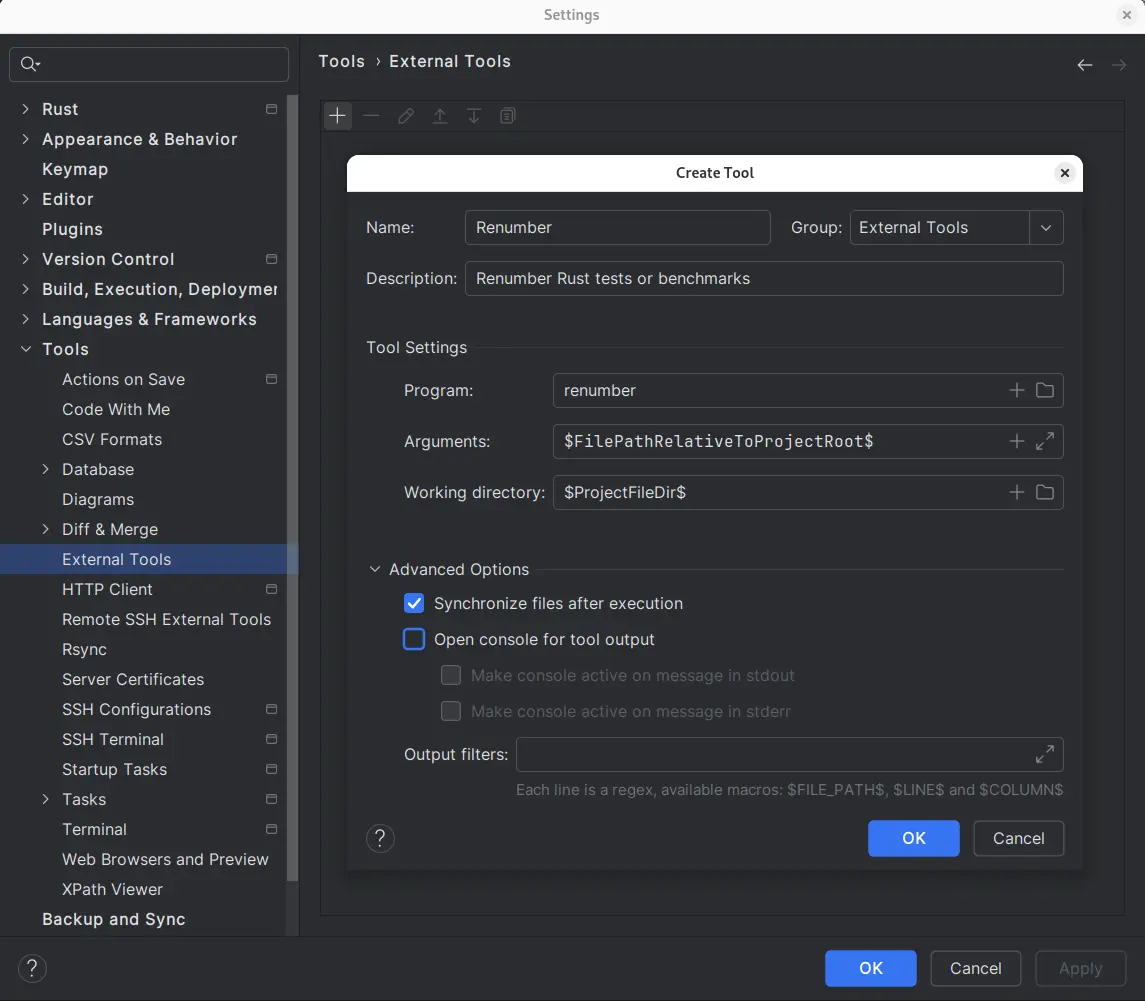
Open Settings | Tools | External Tools window.
Add a new configuration as shown below:
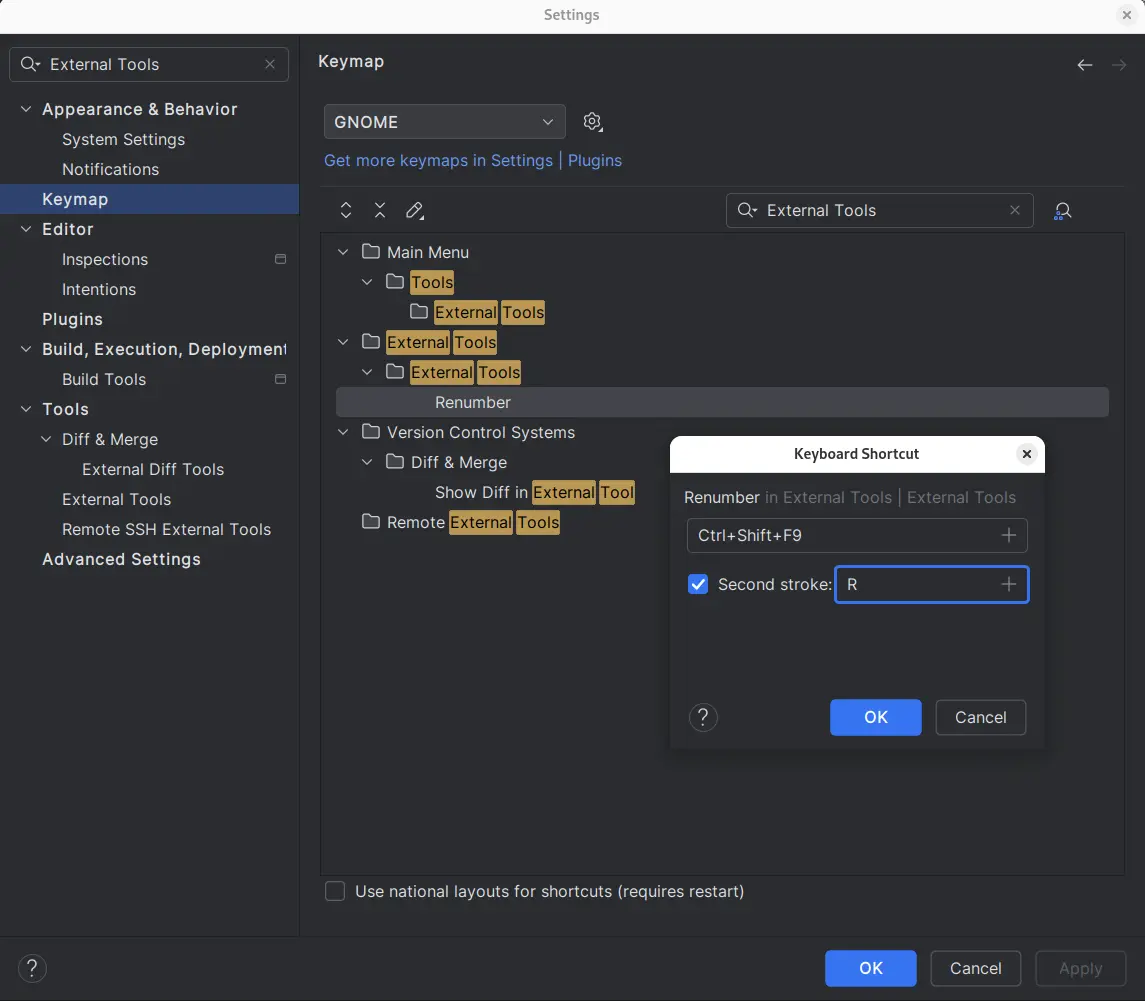
Add new keyboard shortcut:
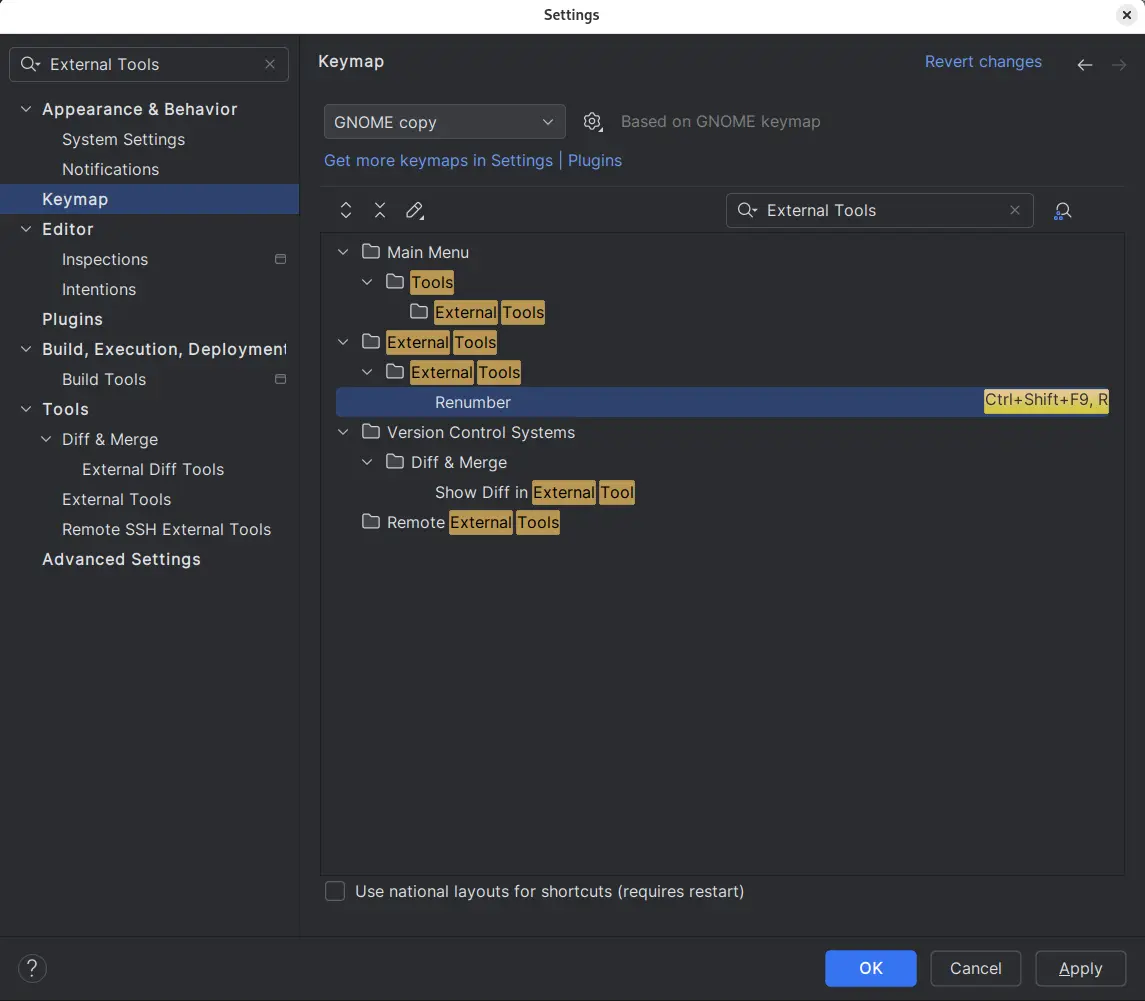
Accept changes:
RFCs
- RFC 2119 Key words for use in RFCs to Indicate Requirement Levels
References
Rust formatter configuration
Rust formatting configuration is stored in file rustfmt.toml.
Unstable but handy
imports_granularity = "Module"
tab_spaces = 2
max_width = 180
unstable option: imports_granularity
Can be used like this:
cargo +nightly fmt
Rust notes
Installing Rust
curl --proto '=https' --tlsv1.2 -sSf https://sh.rustup.rs | sh
Output:
info: downloading installer

Welcome to Rust!

This will download and install the official compiler for the Rust
programming language, and its package manager, Cargo.

Rustup metadata and toolchains will be installed into the Rustup
home directory, located at:

  /home/user_name/.rustup

This can be modified with the RUSTUP_HOME environment variable.

The Cargo home directory located at:

  /home/user_name/.cargo

This can be modified with the CARGO_HOME environment variable.

The cargo, rustc, rustup and other commands will be added to
Cargo's bin directory, located at:

  /home/user_name/.cargo/bin

This path will then be added to your PATH environment variable by
modifying the profile files located at:

  /home/user_name/.profile
  /home/user_name/.bash_profile
  /home/user_name/.bashrc

You can uninstall at any time with rustup self uninstall and
these changes will be reverted.

Current installation options:


   default host triple: x86_64-unknown-linux-gnu
     default toolchain: stable (default)
               profile: default
  modify PATH variable: yes

1) Proceed with installation (default)
2) Customize installation
3) Cancel installation
>
Select option 1:
rustup show
Output:
Default host: x86_64-unknown-linux-gnu
rustup home:  /home/user_name/.rustup

stable-x86_64-unknown-linux-gnu (default)
rustc 1.58.1 (db9d1b20b 2022-01-20)
rustup toolchain install nightly
rustup default nightly
rustup target install x86_64-unknown-linux-musl
Analyzing assembly code
Analyzing assembly code generated by Rust: https://godbolt.org/
Static site generators in Rust
- Zola: https://github.com/getzola/zola
- Shokunin: https://github.com/sebastienrousseau/shokunin
- Cobalt: https://github.com/cobalt-org
- MdBook: https://github.com/rust-lang/mdBook
- Adduce: https://github.com/DeclanChidlow/Adduce
- Doctave: https://github.com/Doctave/doctave
General set of SSGs
Task file template for Rust projects
version: '3'

silent: true

tasks:

  build:
    desc: Builds in debug mode
    cmds:
      - cmd: cargo build

  clean:
    desc: Cleans all targets
    cmds:
      - cmd: cargo clean

  cov:
    desc: Generates code coverage report
    cmds:
      - cmd: cargo llvm-cov --no-cfg-coverage --no-cfg-coverage-nightly --workspace --html
      - cmd: echo -e "\n\e[1;32mOpen coverage report\x3A\e[0m file:///$(pwd)/target/llvm-cov/html/index.html\n"

  doc:
    desc: Generates documentation
    cmds:
      - cmd: cargo doc --no-deps

  doc-open:
    desc: Generates documentation and opens it in browser
    cmds:
      - cmd: cargo doc --no-deps --open

  test:
    desc: Runs tests in debug mode
    cmds:
      - cmd: cargo test

  clippy:
    desc: Runs clippy for all targets
    cmds:
      - cmd: cargo clippy --all-targets

  fmt:
    desc: Runs code formatter
    cmds:
      - cmd: cargo +nightly fmt

  help:
    desc: Runs short help option
    cmds:
      - cmd: cargo run -- -h

  help-long:
    desc: Runs long help option
    cmds:
      - cmd: cargo run -- --help

  install:
    desc: Builds and installs release version
    cmds:
      - cmd: cargo +stable install <name> --path=. --force
Tweaking blockchains
Juno
Show wasm parameters
junod query wasm params --chain-id=juno-1 --node="tcp://88.99.164.158:1067"
List all code blobs
junod query wasm list-code --chain-id=juno-1 --node="tcp://88.99.164.158:1067"
Show code info of code blob with identifier 100
junod query wasm code-info 100 --chain-id=juno-1 --node="tcp://88.99.164.158:1067"
Show pinned code blobs
junod query wasm pinned --chain-id=juno-1 --node="tcp://88.99.164.158:1067"
List instances of contracts instantiated from code with identifier 1
junod query wasm list-contract-by-code 1 --chain-id=juno-1 --node="tcp://88.99.164.158:1067"
Osmosis
Show wasm parameters
osmosisd query wasm params --chain-id=osmosis-1 --node="https://rpc.osmosis.zone:443"
List all code blobs
osmosisd query wasm list-code --chain-id=osmosis-1 --node="https://rpc.osmosis.zone:443"
Show code info of code blob with identifier 100
osmosisd query wasm code-info 100 --chain-id=osmosis-1 --node="https://rpc.osmosis.zone:443"
Show pinned code blobs
osmosisd query wasm pinned --chain-id=osmosis-1 --node="https://rpc.osmosis.zone:443"
Download code blob for contract with code id = 7 and save to file code12.wasm
osmosisd query wasm code 7 code12.wasm --chain-id=osmosis-1 --node="https://rpc.osmosis.zone:443"
List instances of contracts instantiated from code with identifier 100
osmosisd query wasm list-contract-by-code 100 --chain-id=osmosis-1 --node="https://rpc.osmosis.zone:443"
Query contract state
//wrong
osmosisd query wasm contract-state smart osmo1xwahguax578tvequeg70xn0ej78gn2ahugq92m7dx8hkklsyupmsqqh66x '{"all_tokens":{}}' --chain-id=osmosis-1 --node="https://rpc.osmosis.zone:443"

//correct
osmosisd query wasm contract-state smart osmo1xwahguax578tvequeg70xn0ej78gn2ahugq92m7dx8hkklsyupmsqqh66x '{"list_proposals":{}}' --chain-id=osmosis-1 --node="https://rpc.osmosis.zone:443"
Wasmd
Creating single-node blockchain locally
Original instructions can be found here.
Below are the ones used on Linux, based on the general instructions.
Go to wasmd folder of freshly cloned repository.
git clone https://github.com/CosmWasm/wasmd.git
cd wasmd
make install
sudo ln -s ~/go/bin/wasmd /usr/local/bin/wasmd
cd scripts/contrib/local
setup_wasmd.sh
start_node.sh
All the chain configuration files are stored in ~/.wasmd.
To start the configuration from the very beginning, just remove this directory:
rm -rf ~/.wasmd
To list all smart contact codes on the chain, run:
wasmd query wasm list-code
Output:
code_infos: []
pagination:
  next_key: null
  total: "0"
Some error messages reported by
wasmd query wasm code-info:
code id: invalid
wasmd query wasm code-info 0
Error: rpc error: code = Unknown desc =
github.com/cosmos/cosmos-sdk/baseapp.gRPCErrorToSDKError
	github.com/cosmos/cosmos-sdk@v0.47.5/baseapp/abci.go:720
[...]
net/http.(*conn).serve
	net/http/server.go:2009
code id: invalid: unknown request
code id 100: no such code
wasmd query wasm code-info 100
Error: rpc error: code = Unknown desc =
github.com/cosmos/cosmos-sdk/baseapp.gRPCErrorToSDKError
	github.com/cosmos/cosmos-sdk@v0.47.5/baseapp/abci.go:720
[...]
net/http.(*conn).serve
	net/http/server.go:2009
code id 100: no such code: unknown request
wasmd query wasm code-info 18446744073709551615
Error: rpc error: code = Unknown desc =
github.com/cosmos/cosmos-sdk/baseapp.gRPCErrorToSDKError
	github.com/cosmos/cosmos-sdk@v0.47.5/baseapp/abci.go:720
[...]
net/http.(*conn).serve
	net/http/server.go:2009
code id 18446744073709551615: no such code: unknown request
input parsing errors
wasmd query wasm code-info alfa
Error: strconv.ParseUint: parsing "alfa": invalid syntax
wasmd query wasm code-info 1.234
Error: strconv.ParseUint: parsing "1.234": invalid syntax
wasmd query wasm code-info 18446744073709551616
Error: strconv.ParseUint: parsing "18446744073709551616": value out of range
Tweaking GitLab
drwx         .ssh        [700]
-rw------    id_rsa      [600]
-rw-r--r--   id_rsa.pub  [644]
-rw-r--r--   config      [644]
Content of the config file:
Host gitlab.com
  UpdateHostKeys no
Updating NPM dependencies
Checking outdated dependencies:
npm outdated
Example output:
Package              Current  Wanted  Latest  Location                          Depended by
copy-webpack-plugin   10.2.4  10.2.4  11.0.0  node_modules/copy-webpack-plugin  app
css-loader             6.6.0   6.7.1   6.7.1  node_modules/css-loader           app
html-loader            3.1.0   3.1.2   4.2.0  node_modules/html-loader          app
ts-loader              9.2.6   9.4.1   9.4.1  node_modules/ts-loader            app
typescript             4.5.5   4.8.4   4.8.4  node_modules/typescript           app
uuid                   8.3.2   8.3.2   9.0.0  node_modules/uuid                 app
webpack               5.69.1  5.75.0  5.75.0  node_modules/webpack              app
webpack-cli            4.9.2  4.10.0  4.10.0  node_modules/webpack-cli          app
webpack-dev-server     4.7.4  4.11.1  4.11.1  node_modules/webpack-dev-server   app
For an advanced and customizable upgrading experience use npm-check-updates:
sudo npm install -g npm-check-updates
Check dependencies:
ncu
Example output:
[====================] 15/15 100%

 copy-webpack-plugin  ^10.2.4  →  ^11.0.0
 css-loader            ^6.6.0  →   ^6.7.1
 html-loader           ^3.1.0  →   ^4.2.0
 ts-loader             ^9.2.6  →   ^9.4.1
 typescript            ^4.5.5  →   ^4.8.4
 uuid                  ^8.3.2  →   ^9.0.0
 webpack              ^5.69.1  →  ^5.75.0
 webpack-cli           ^4.9.2  →  ^4.10.0
 webpack-dev-server    ^4.7.4  →  ^4.11.1
Upgrade and install new versions of dependencies:
ncu -u
npm install
Using pass tool in Fedora
Installation
sudo dnf install pass
sudo dnf install gnupg2
Setup
Check is any keys already exist:
gpg --list-keys
Output:
gpg: directory '~/.gnupg' created
gpg: ~!/.gnupg/trustdb.gpg: trustdb created
The ~/.gnugpg directory should look like this:
tree .gnugpg
Output:
.
├── common.conf
├── public-keys.d
│   ├── pubring.db
│   └── pubring.db.lock
└── trustdb.gpg

2 directories, 4 files
If public-keys.d directory does not exist, then run:
gpg -K
Generate new GPG key:
gpg --generate-key
Initialize your password store with generated GPG key.
pass init GPG-ID
where GPG-ID is the email address of your generated GPG key.
Output:
Password store initialized for GPG-ID
References
YubiKey
Overview
YubiKey can be used as 2FA in GitHub, GitLab, Google Account, … ?
Important
Set the PIN for each YubiKey.
Install YubiKey manager
Fedora
sudo dnf install ykman
macOs
brew install ykman
Usage
List connected YubiKeys
ykman list
Output should be similar to this:
YubiKey 5C NFC (5.7.1) [OTP+FIDO+CCID] Serial: 12345678
Set PIN
ykman fido access change-pin
Check credentials
ykman fido credentials list
Output should be similar to this:
Credential ID  RP ID       Username      Display name
23478ea6...    google.com  john@doe.com  John Doe
a4bc21db...    google.com  john@doe.org  John Doe